Adding Probabilistic Reasoning to MongoDB Atlas Stream Processing with LLMs
 Photo by AnimGraph Lab on Unsplash
AI is transforming every layer of computing — from infrastructure to user interfaces — and streaming data systems are no exception. So, you might wonder, what about Atlas Stream Processing? Let me show you.
First of all, if you aren’t familiar with Atlas Stream Processing you can check out this post here, but the TL;DR is that it’s a first-class, cost-effective, performant, and easy-to-use interface to streaming systems for MongoDB Atlas. If you are a MongoDB user and want to integrate data in motion, Atlas Stream Processing is for you.
In this post, I am going to show you how to easily integrate Atlas Stream Processing with OpenAI to use an LLM to process data and add probabilistic capabilities to your stream processing pipelines. I am also going to show you how you can parse JSON results from the LLM back into the pipeline and write this potentially highly dynamic data (potentially a new schema for each event) into MongoDB.
Why would I use an LLM with a stream processor?
Generally speaking, stream processors excel at deterministic logic — filtering, transforming, and routing data based on defined rules. But what if your use case demands something less binary, like inferring likely causes from symptoms, estimating time to resolution, or generating recommendations based on a stream of data? By integrating an LLM into your stream pipeline, you introduce probabilistic reasoning into the flow — allowing your system to interpret ambiguous input, make educated guesses, and enrich events with intelligent, context-aware insights. This massively expands what is possible in stream processing, especially in domains like diagnostics, customer service, or risk analysis.
A note on prompting
When integrating LLMs into stream processing pipelines, the prompt becomes a critical piece of your pipeline. Since LLMs respond based on the input they receive, the structure, tone, and clarity of your prompt will directly impact the consistency and quality of the output. In this use case, the prompt guides the model to return structured JSON suitable for downstream processing. However, prompts can — and often should — be highly variable, tailored to different data types, equipment categories, or diagnostic needs. It’s essential to version and test prompts carefully, especially when expecting consistent schema formats, as even small wording changes can lead to unpredictable results. Perhaps the prompt itself comes from a $lookup query or in the message header.
How to use AI with Atlas Stream Processing
Integrating an LLM with Atlas Stream Processing is more straightforward than you might think. At a high level we are going to call out to the LLM API for each message flowing through our pipeline. We will create a window stage to aggregate data ahead of the call so we aren’t hitting the API too frequently. We return the results of the LLM to the processor, enrich the data, and continue processing the pipeline.
The general data flow could look like this:
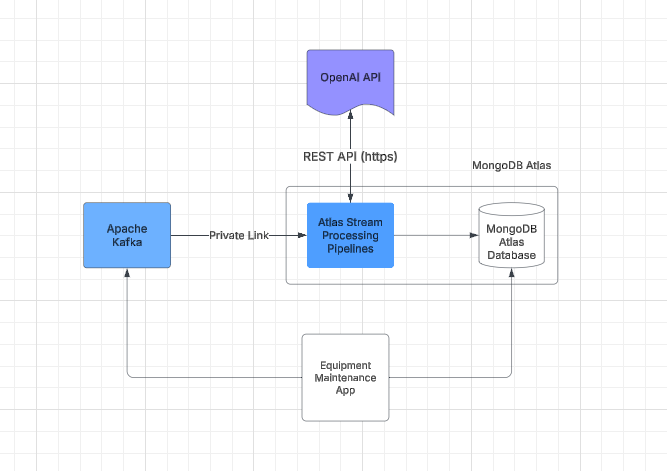 Example Equipment Maintenance App using LLM and Atlas Stream Processing
Let’s dive into the code and build a processor. Our use case will be to process maintenance records for heavy equipment. Imagine a technician in the field servicing a large piece of heavy equipment like an excavator.
The technicians scribble in information about the problem, and that data gets transmitted through Apache Kafka and lands in the MongoDB database. Now, what if we want to enrich that data to process that natural language as it flows to give some potential problems and fixes, and add a simple time estimate for the work using AI? Enter the LLM.
For example, if we have technicians entering data like this BEFORE processing/enrichment via the LLM:
{
  machine_id: 'CAT-D8T-2',
  machine_type: 'CAT-980L Loader',
  engine_hours: 9632,
  year_of_manufacture: 2013,
  timestamp: '2025-03-25T15:18:13Z',
  issue_report: "Issue logged for CAT-980L Loader: Hydraulic fluid leakage
         suspected. Sensor shows hydraulic pressure at 2224.83 psi, which
         is within normal range, but visual inspection reveals seepage
         around hydraulic fittings. With engine hours at 9632, it's likely
         the seals or hoses are worn. Replacing them should do the trick.",
  sensor_data: { hydraulic_pressure: 2224.83, temperature: 154.93, vibration: 0.2 },
  maintenance_history: [
    { date: '2020-04-20', description: 'Hydraulic pump replacement' },
    { date: '2023-06-18', description: 'Battery replacement' },
    { date: '2023-12-25', description: 'Transmission service' },
    { date: '2024-01-08', description: 'Brake system check' }
  ]
}
We can process that data through the pipeline, and enrich the message so it now shows probable issues and an estimation of the time required to fix them. So the data AFTER processing/enrichment via the LLM looks like this:
content: {
  machine_id: 'CAT-D8T',
  issue: {
    description: 'Lower than optimal hydraulic pressure possibly due to a hydraulic fluid leak.',
    likely_causes: [
      'Worn or damaged seals around the main hydraulic pump',
      'Hydraulic line leaks',
      'Failure of hydraulic components'
    ],
    recommended_actions: [
      'Inspect hydraulic fluid levels and check for visible leaks.',
      'Examine seals around the main hydraulic pump for wear or damage.',
      "Conduct a pressure test to assess the system's integrity.",
      'Inspect hydraulic lines and fittings for signs of wear or leaks.',
      'Replace any defective seals, lines, or components as needed.'
    ]
  },
  diagnosis: {
    initial_inspection_needed: true,
    likely_parts_needed: [
      'Replacement seals',
      'Hydraulic fluid',
      'New hydraulic lines (if leaks are identified)'
    ],
    further_tests_required: true,
    comments: 'Prompt repair is critical to prevent operational downtime.'
  },
  time_estimation: {
    preliminary_inspection: '2 hours',
    parts_replacement: '4 hours',
    testing_and_final_adjustments: '2 hours',
    total_estimated_time: '8 hours'
  }
},
The data not only becomes enriched with potential recommended actions but also has a list of required parts and an estimation of the time to fix the issue.
Let’s discuss how we did that.
Step 1: The connection registry
There are two main steps to achieving this — one is to create the connection registry for the sources and sinks required. One for the Kafka topic, one for the database we write to, but also one for the https endpoint for the OpenAI API. You can use the Atlas CLI/API or just use the Atlas UI by clicking on StreamProcessing- «instance»-Connections and add a new connection. It will look something like this:
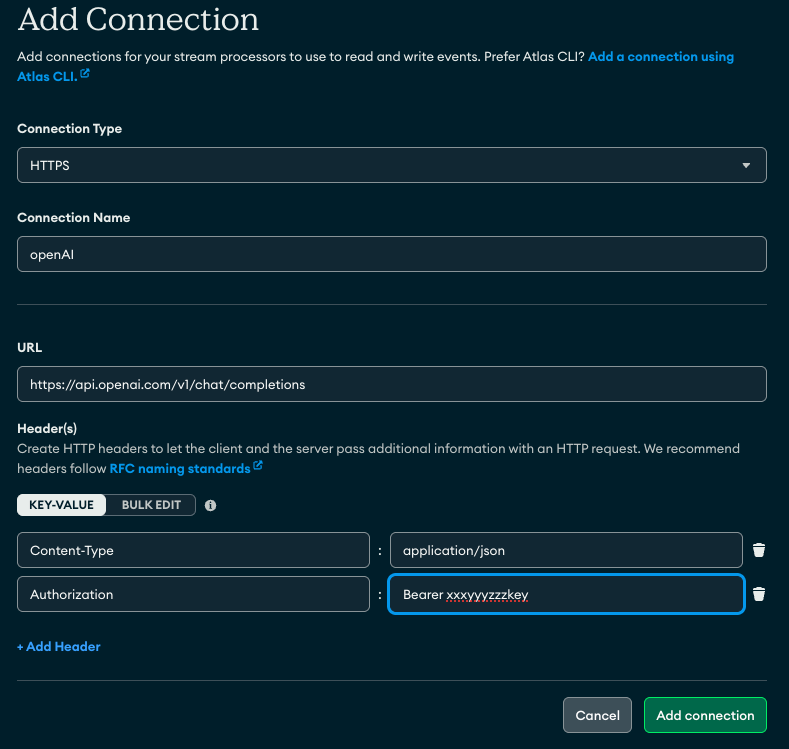 Creating an HTTPS connection registry entry for OpenAI completions API
Step 2: The processor
Below is the code for the processor. The key with this example is to ensure the LLM prompt returns valid JSON (it will return it as a string datatype, however) then we instruct the $https operator to parse the string to JSON using the parseJSONStrings config parameter. This is the trick to happy LLM interoperability when using the $https operator and AI!
Lastly, note how dynamic the schema can be, after all this isn’t a declarative interface, we are prompting an AI to give us probabilistic results. MongoDB is highly adaptable for this type of use case.
// define a processor
let processor = [
  // Kafka source
  {
    $source: {
      connectionName: "cat_maint_demo_topic",
      topic: "maint_demo_topic"
    },
  },
  // the HTTPs stage - call the LLM this is LLM specific.
  // use the payload field to present the required keys to the API
  // results are placed into apiResults document.
  // parseJsonStrings ensures the results are parsed to JSON. The prompt
  // must indicate to return in JSON and response format.
  {
    $https: {
      connectionName: "AzureChatGPT",
      method: "POST",
      as: "apiResults",
      config: {parseJsonStrings: true},  // ensure this is here!
      payload: [
        {
          $project: {
            _id: 0,
            model: "gpt-4o-mini",
            response_format: { type: "json_object" },
            messages: [
              {
                role: "system",
                content: "You are an expert heavy equipment diagnostics AI. \
                         Evaluate the issue report and provide a detailed
                         analysis and an estimation of the time required to
                         fix in JSON format"
              },
              { role: "user", content: "$issue_report" },
            ],
          },
        },
      ],
    },
  },
  // results formatting
  {
    $project: {"apiResults.choices": 1}
  },
  // write to mongodb
  {
    $merge: {
      connectionName: "cat_maint_demo",
      db: "demo",
      coll: "cat_maint_demo",
      whenMatched: [
        {
          $set: {
            issue_analysis: { $arrayElemAt: ["$apiResults.choices.message.content", 0] },
            time_estimate: { $arrayElemAt: ["$apiResults.choices.message.content", 1] }
          },
        },
      ],
    },
  }
];

// create and start the processor
// can also use sp.process(processor) to see results when building the pipeline
sp.createStreamProcessor('maint_demo', processor);
sp.maint_demo.start()
Common Questions
A few common questions come up when using this operator in this way, so let me try to address a couple up front.
- How is performance?
The $https stage is executed per message. So in a high-volume streaming use case, that could be a lot of calls. Performance is gated mostly on LLM performance. That said, a great approach is to use a window stage (tumbling, hopping, session, etc) and process calls at the end of the window period, like every 10 seconds or once a day. This depends on your use case. But it helps reduce the number of calls required. For example, an IoT use case could perform avg() on the temperature before calling the LLM every hour. - How are costs?
Similar to performance, you may want to use various techniques like a window or matching only particular messages to help reduce the number of calls to the LLM to save costs/tokens. - What about Atlas Vector Search? How does it play into this?
Atlas Vector Search is a great way to add memory to this process. Think of the LLM as the reasoning agent and Vector Search indexes on MongoDB data as the memory. One could construct a pipeline that ties these two together to add common fixes, historical work on the machines, and more. This is a larger topic that requires its own wider discussion. - Going further. If this was a real example, we might want to train our model directly on the history of maintenance of our equipment using manufacturer maintenance procedure manuals, historical fixes stored in databases (like MongoDB), and so on. This would yield better results over time, making the LLM (at this point likely proprietary) smarter at reasoning what is wrong with our fleet.
Conclusion
Using this blog post, you are now able to weave probabilistic reasoning into your stream processing using an LLM and the new $https operator stage for Atlas Stream Processing — give it a whirl here: https://www.mongodb.com/docs/atlas/atlas-stream-processing/tutorial/
Adding Probabilistic Reasoning to MongoDB Atlas Stream Processing with LLMs was originally published in Towards Dev on Medium, where people are continuing the conversation by highlighting and responding to this story.