How RadWeather Got Built: Three People, Three Problems, One Weekend
I learn by building. Reading about something, watching a tutorial — none of it arborizes the way actually making something does. Getting hands dirty, hitting real problems, shipping something that works. That’s how new technology sticks for me. This one started with three real problems landing at once.
My brother was driving from Texas to Colorado. He’s a resourceful guy, and drives a brand new 4 runner, so the likelyhood of bad things happening was low. But, nevertheless, he wanted weather along the route, not a general forecast, but actual conditions at the places he’d be driving through. He’s ex-Apple so that means IoS guy. He wanted Siri integration. Something where he could just say “Hey Siri, Route Weather” and get a briefing read back to him without touching his phone.
Same weekend, My wife was at soccer tournaments with our daughter. Texas weather being what it is, she needed to know if the storm she could see building on the horizon was going to hit in 20 minutes or 90. Not tomorrow’s forecast. Not a seven-day outlook. The next hour, high-resolution, right there.
And I wanted to go deeper with Claude Code. Not just use it as a fancy autocomplete — actually build something agentic-first, where the API itself was designed to be consumed by AI agents as naturally as by humans.
Three use cases. All solved by the same tool.
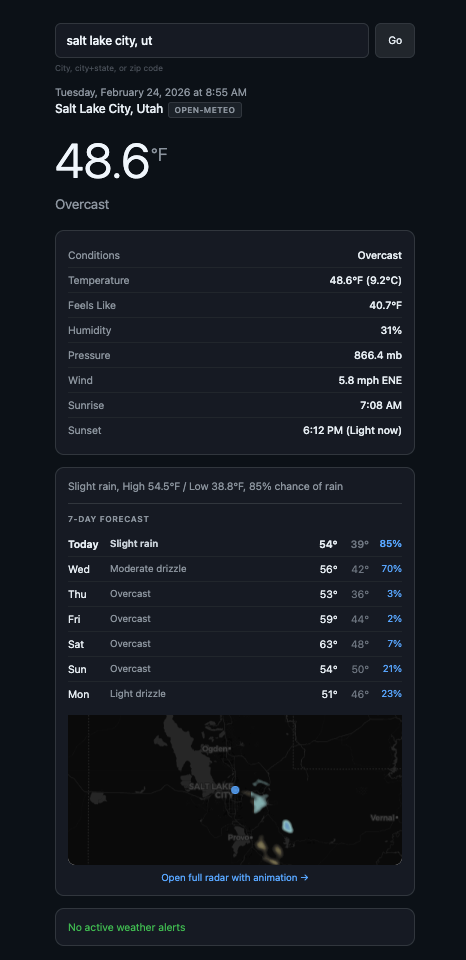 the radweather human inteface
The GitHub repo started as a single file: prd.md. I put on my product manager hat and wrote a detailed description of the problem (a PRD or product requirements description) who the users were, what they needed, what done looked like. No code, no scaffolding, just a clear articulation of the pain point from the users perspective. Claude Code took it from there.
Step 1: Human (me) writes the user pain points.
Step 2: Claude helps form that into PRD.
Step 3: Human (me) tunes the PRD.
Step 4: Let Claude Code rip in planning mode, then build.
Step 5: Human (me) functional testing. Commit/push.
That turned out to eye opening to say the least. A well-written PRD gives Claude Code the context it needs to make good decisions independently. It’s not just a starting point — it’s the north star the agent returns to when it’s evaluating tradeoffs. The more specific you are about the problem, the better the output.
One tip I’d pass along to anyone building this way: when significant decisions get made during a session, have Claude write them down as markdown before you move on. The algorithm you chose, the design tradeoff, the reason you picked one API over another. Durable, committed markdown in the repo means Claude Code can always pick up where it left off with full context. It also solves context bloat — instead of feeding a model a massive conversation history, you feed it a well-maintained set of docs that capture the decisions that matter.
Claude Code runs on two recycled M1 Mac Minis I have in a my rack. A dynamic duo that builds software while I sleep. The workflow is simple and it’s become a rhythm: I write the PRD, kick off the build before bed, wake up to working software, functionally test it, note what needs to change, and repeat. It’s the closest thing I’ve found to having a tireless engineer on the team who doesn’t need standups. But in this case, radweather came to life in just a couple hours over coffee. Yes, wow.
The thing that’s different about RadWeather compared to every other weather app (maybe, there are a lot) is that it’s designed for AI consumption from the ground up. The /raw endpoint returns plain text that Claude can read directly and reason about. No parsing, no JSON wrangling, no API key gymnastics. You just tell your agent to fetch radweather.net/raw?location=dallas,tx and it works. Most weather APIs are built for developers who have time to integrate an SDK, manage auth tokens, and parse nested JSON. RadWeather assumes you might be a Siri Shortcut, a Claude agent, skill, or a bash script. No key required. The /raw endpoint is designed to be read aloud or dropped straight into a prompt.
I also have a Tempest WeatherFlow station in my yard, and I wanted RadWeather to use it natively. Plug in your Tempest station ID and the app pulls directly from your personal hardware — temperature, wind, precipitation, all of it from a sensor 30 feet from your front door. When you’re pulling from a personal station the UI shows a hyperlocal badge, a small but meaningful distinction from a generic city or zip code lookup. There’s something satisfying about knowing the data is coming from your own equipment rather than an interpolated grid somewhere nearby. Any public Tempest station works, not just mine — so if you have one, or know someone who does, you can use it.
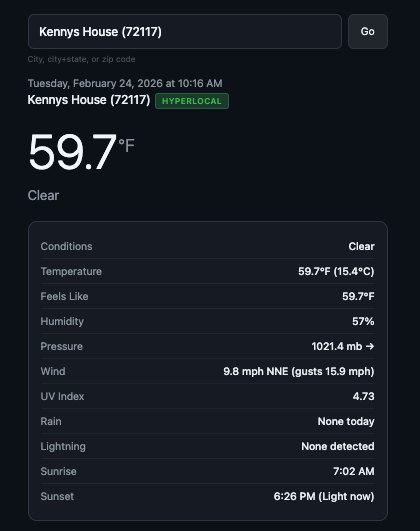 hyperlocal weather forecast using Tempest weather stations
The route feature took the most iteration. The goal was simple: you’re in the car, you say “Hey Siri, Route Weather,” Siri asks where you’re going, grabs your GPS, and reads you a 30-second briefing for the drive. No app to install. No login. The tricky part is that Siri Shortcuts are fussy and the spoken summary has to be short enough to not be annoying but complete enough to be useful. I landed on five waypoints — start, 25%, 50%, 75%, destination — and a spoken output that leads with any active NWS alerts, then gives you temperature range, precipitation chance, and wind. That constraint forced a lot of design decisions. Iterating with Claude Code getting it right.
  # a simple example in python for machine access
  import anthropic
  import httpx

  # Fetch live weather (no API key needed)
  weather = httpx.get("https://www.radweather.net/raw?location=dallas,tx").text

  # Ask Claude about it
  client = anthropic.Anthropic()
  message = client.messages.create(
      model="claude-sonnet-4-20250514",
      max_tokens=1024,
      messages=[{
          "role": "user",
          "content": f"Here are the current conditions:\n\n{weather}\n\n"
                     f"Should I bring an umbrella today?"
      }]
  )
  print(message.content[0].text)
I’ve been using Claude Code for a while, but this project was the first time I really let it drive. Not just write this function but build this feature, wire it to this endpoint, handle these edge cases. The agentic loop — where Claude Code reads files, runs the server, tests the endpoint, sees what came back, and iterates — is genuinely different from pair programming with an LLM. The place it shines is boring-but-necessary work: rate limiting, error handling, the cookie-based defaults system, the radar integration with RainViewer. Things I would have procrastinated on got done in minutes. The place it needs guidance is design decisions that require actual context about the use case. It’ll build you something that works without understanding what works means for a soccer mom watching radar from a sideline versus a driver crossing the Texas Panhandle. That’s still the human’s job.
Radweather.net is free and open for anyone to use at radweather.net. No accounts, no keys, no surprises. If you’re building something — a Shortcut, an automation, an AI agent that needs weather context — the API is right there. The project will keep evolving, particularly around hyperlocal nowcasting for that “next hour” use case that started all of this.
For now, it’s a humble little tool but it does exactly what my brother, my wife, and I needed. That’s a good start.
And yeah, it’s exciting, and terrifying to see how this new development paradigm is progressing.