Atlas Stream Processing $iceberg Private Preview
 October 10, 2025

Photo: James Lee
Writing to Iceberg table format from MongoDB Atlas
So you have your OLTP or ODS data in MongoDB, and you want process that data into an OLAP system for reporting and analytical duties. But you are worried about the cost and complexity of existing solutions. Well, this new Atlas Stream Processing stage called $iceberg might be for you.
If you are ready to try $iceberg, sign up for the private preview here: https://forms.gle/gyvdfCD65vmEq4g88
Apache Iceberg is an open table format built for large-scale analytics on cloud object storage. It brings database-like capabilities like schema evolution, ACID transactions, partitioning, and versioning, to files stored in S3, GCS, or Azure Blob Storage. In the context of Atlas Stream Processing, Iceberg acts as a powerful intermediate data layer between MongoDB and downstream analytics systems. Rather than pushing data directly into warehouses through complex ETL or CDC pipelines, you can continuously stream data from MongoDB into Iceberg tables, which can then be read natively by Snowflake, Databricks, etc. This approach simplifies architecture, reduces cost, and provides a consistent, open, and low-latency bridge between your operational data and your analytical workloads. And best, it’s easy to do.
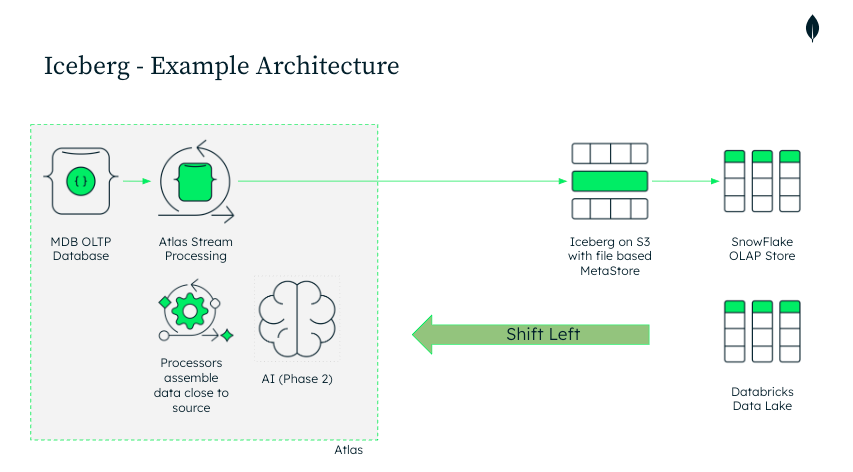
This architecture represents a shift-left approach to analytics with MongoDB. Instead of relying on heavyweight ETL pipelines or third-party connectors to move data from an OLTP database into Snowflake or Databricks, Atlas Stream Processing enables data transformation and enrichment closer to the source. By streaming operational data directly into Apache Iceberg tables on cloud object storage, teams eliminate unnecessary infrastructure layers, monitoring endpoints, and intermediate jobs. The result is a simpler, more maintainable architecture that lowers cost, reduces latency, and keeps analytical data in sync with MongoDB in near real time — all while maintaining openness and interoperability through the Iceberg standard. Because writes are committed through the Iceberg client using atomic metadata updates, downstream systems always see a fully consistent snapshot of the data, never a partial or in-flight state.
Here is how it works. With Atlas Stream Processing you build a streaming pipeline in familiar MongoDB aggregation syntax, and finish with a sink stage — $iceberg — that writes the results to an Iceberg table in your cloud object storage. You point it at a connection, bucket, and table name and you’re done.
Here’s a minimal end-to-end example: start with a source (e.g., an orders collection), do a simple mutation with $project, an optional filter with $match, then land the stream in $iceberg.
{
  name: "syncToSnow",
  pipeline: [
    // 1) Source: stream events from a connection (e.g., MongoDB collection or Kafka topic)
    {
      $source: {
        connectionName: "ordersConn",
        db: "prod01",
        coll: "orders"
      }
    },

    // use the full document as the stream
    {
      $replaceRoot:
        {newRoot:{"$fullDocument"}}
    },

    // 2) Optional filter: only keep paid orders
    {
      $match: {
        status: "paid"
      }
    },

    // 3) Mutate/shape: flatten and type-cast fields for analytics
    {
      $project: {
        orderId: "$_id",
        amount: { $toDecimal: "$total" },
        ts: { $toDate: "$createdAt" },
        customerEmail: "$buyer.email",
        _id: 0
      }
    },

    // 4) Sink to Iceberg: write tables to your object storage
    {
      $iceberg: {
        connectionName: "s3Conn",
        bucket: "my-analytics-bucket",
        path: "iceberg/orders",
        tableName: "orders",
        operationType: "auto",

        // optional
        schemaInference: { strategy: "topLevel" },
        idFieldName: "_id",
        region: null
      }
    }
  ]
}
That’s the whole processor: assemble your transforms with aggregation stages you already know, then add a single $iceberg sink to publish an open Iceberg table that Snowflake or Databricks can read immediately with a SQL command like this (this is specific to Snowflake):
-- 1) Give Snowflake access to your S3 bucket
CREATE OR REPLACE EXTERNAL VOLUME s3_ext
  STORAGE_LOCATIONS = (
    (
      NAME = 'orders_loc',
      STORAGE_PROVIDER = 'S3',
      STORAGE_BASE_URL = 's3://my-analytics-bucket/',
      STORAGE_AWS_ROLE_ARN = 'arn:aws:iam::<ACCOUNT_ID>:role/<ROLE_WITH_S3_ACCESS>'
    )
  );

-- 2) Use the OBJECT_STORE catalog type for Hadoop-style Iceberg
CREATE OR REPLACE CATALOG INTEGRATION iceberg_obj_store
  CATALOG_SOURCE = OBJECT_STORE
  TABLE_FORMAT   = ICEBERG
  ENABLED        = TRUE;

-- 3) Register the existing Iceberg table (external) as a staging table
CREATE OR REPLACE ICEBERG TABLE staging.orders_iceberg
  EXTERNAL_VOLUME    = 's3_ext'
  CATALOG            = 'iceberg_obj_store'
  METADATA_FILE_PATH = 'iceberg/orders/metadata/v1.metadata.json';

-- 4) Ensure the internal target table exists (infer schema once)
CREATE TABLE IF NOT EXISTS analytics.orders AS
SELECT
  orderId        ::string  AS order_id,
  amount         ::number  AS amount,
  ts             ::timestamp_ntz AS ts,
  customerEmail  ::string  AS customer_email
FROM staging.orders_iceberg
WHERE 1=0;  -- create empty table with the right schema

-- 5) Upsert from the external Iceberg table into the internal Snowflake table
MERGE INTO analytics.orders AS target
USING staging.orders_iceberg AS source
  ON target.order_id = source.orderId
WHEN MATCHED THEN
  UPDATE SET
    target.amount         = source.amount,
    target.ts             = source.ts,
    target.customer_email = source.customerEmail
WHEN NOT MATCHED THEN
  INSERT (order_id, amount, ts, customer_email)
  VALUES (source.orderId, source.amount, source.ts, source.customerEmail);
Schema Inference Strategies
The $iceberg stage supports multiple schema inference strategies that determine how MongoDB maps document fields to Iceberg table columns. Initially, we plan to support topLevel, with more strategies coming later. The topLevel strategy infers table columns directly from the top-level fields of the output documents. As new fields appear in the stream, corresponding columns are added to the table automatically. Each document must include an identifier field (by default _id, or a custom idFieldName) of type ObjectId or string. Mixed field types are not allowed; if a field’s type changes, that record is sent to the DLQ (dead-letter queue). All non-identifier columns are nullable, and columns are created only when a non-null value first appears. This design keeps schema evolution lightweight and predictable while ensuring the Iceberg table accurately reflects your MongoDB data model.
Partitioning
By default, the $iceberg stage partitions the output table on truncate(idFieldName, 5). For documents where the idFieldName (typically _id) is an ObjectId, this effectively partitions data by the embedded timestamp — roughly one partition per hour. Users can customize this behavior using the $iceberg.partitionedBy field.
In the private preview, this takes a restricted form:
{
  $iceberg: {
    partitionedBy: {
      "_id": { "truncate": 10 }
    }
  }
}
This configuration behaves like CREATE TABLE … PARTITIONED BY (truncate(_id, 10)).
The partitionedBy document can currently define only one field, which must match the $iceberg.idFieldName, and the value must specify a positive integer greater than 1.
At general availability (GA), we plan to expand this with full support for flexible partitioning strategies, including identity, year, and bucket transforms, for example:
{
  $iceberg: {
    partitionedBy: {
      "field1": { "truncate": 5 },
      "field2": "",
      "field3": "year",
      "field4": { "bucket": 20 }
    }
  }
}
This will allow fine-grained control over how data is organized and optimized for downstream reads from the OLAP systems as they are loaded.
Key Takeaways
Lower latency, lower cost: Native streaming eliminates batch jobs, multiple connectors/topics, and/or staging databases— delivering faster analytics with less infrastructure.
Shift-left data processing: More transformation and enrichment can now happen directly in MongoDB Atlas Stream Processing , reducing the cost and complexity of ETL, staging, and compute on the right side (Snowflake, Databricks, etc.).
Automatic, MongoDB-driven schema inference: The $iceberg stage automatically infers and evolves schema as data flows out of MongoDB, ensuring Iceberg tables stay aligned with your document structures. Multiple inference strategies are supported (and more are coming), so you can tune how deeply MongoDB inspects nested documents — all without manual DDL or schema evolution issues.
Configurable partitioning: By default, $iceberg partitions output tables on a truncated version of the _id field (roughly hourly for ObjectIds), but users can control partition behavior using the $iceberg.partitionedBy option. More flexible transforms — such as identity, year, and bucket partitioning — are planned for GA.
Guaranteed snapshot consistency: The $iceberg client writes using Iceberg’s atomic metadata swaps and snapshot isolation, ensuring downstream systems always see a fully committed, consistent snapshot of the table. Even during concurrent writes or schema evolution, readers never observe partial or intermediate states.
If you are ready to try $iceberg, sign up for the private preview here: https://forms.gle/gyvdfCD65vmEq4g88
Atlas Stream Processing $iceberg Private Preview was originally published in Towards Data Engineering on Medium, where people are continuing the conversation by highlighting and responding to this story.